
Riders who want directions or ride data without keeping a phone screen active can use a bike computer mounted on the handlebars. The right unit depends on whether you need GPS recording, route navigation, offline maps, or connections to sensors and apps.
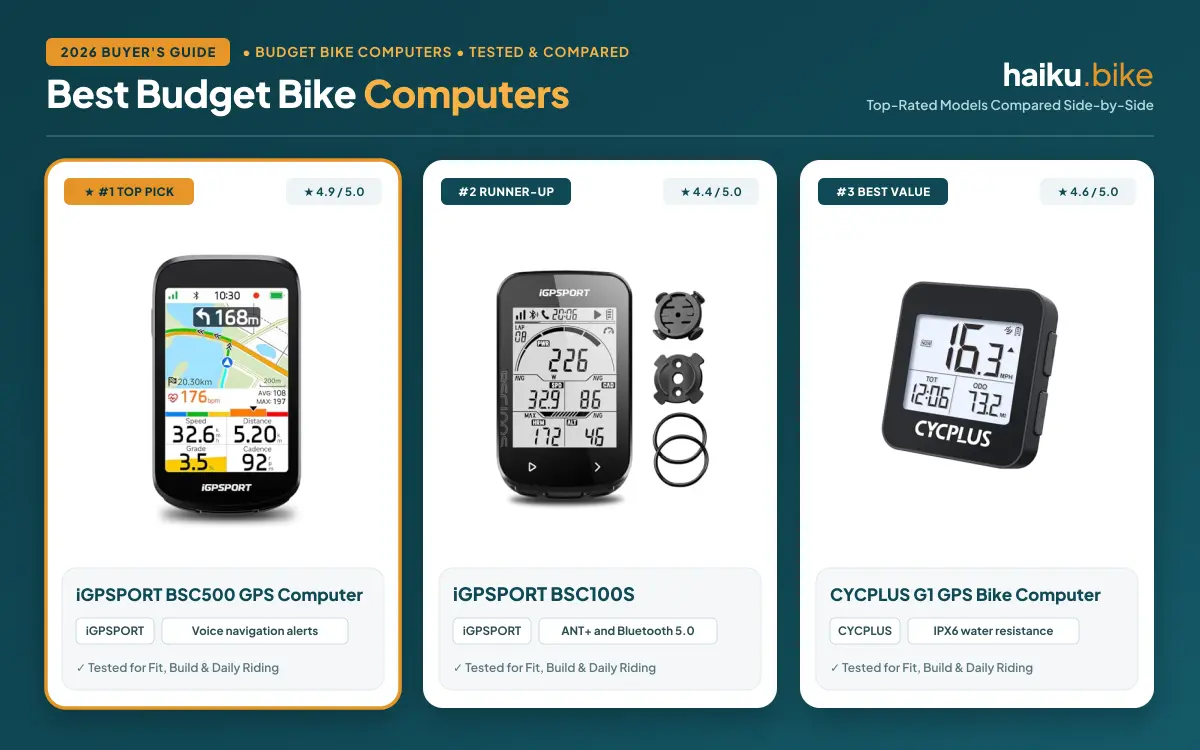
For November 2026, we compare 5 computers from CYCPLUS, iGPSPORT, CooSpo and more, covering simple tracking and route-focused options. Riders prioritizing a lower-cost device can also read our bike computer guide for budget-minded riders.
At a Glance: Which One Fits You
- Best overall: iGPSPORT BSC500 GPS Bike Computer combines a large touchscreen and buttons with voice alerts, turn prompts, and automatic rerouting, though listed battery and water-resistance details are absent.
- Best value: CYCPLUS Wireless GPS Bike Computer G1, 70g focuses on GPS ride records and maker-stated runtime above 55 hours, but route navigation is not listed.
- Best for offline maps: iGPSPORT BSC300T GPS Bike Computer supports offline maps, route previews, and turn prompts, while its smaller screen may not suit riders wanting a larger display.
- Best for sensor connections: COOSPO Color Touchscreen GPS Bike Computer CS600 lists Bluetooth and ANT+ alongside route guidance, but its touch interface may not suit every rider.

Pros
- Touchscreen and button controls
- Up to 12 data fields per page
- Strava and Komoot route imports
- Automatic off-course rerouting
- Voice navigation alerts
Cons
- Battery life not listed
- Water-resistance rating not listed
- Wireless connectivity details not listed

Pros
- More than 55-hour maker-rated runtime
- IPX6 water resistance
- Automatic backlight
- GPS route and altitude data
- About 2.5 oz
Cons
- No listed app connectivity
- No listed sensor pairing
Pros
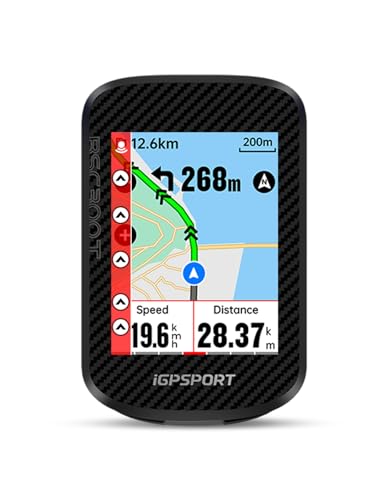
- 2.4-inch touchscreen and six buttons
- Offline maps and turn prompts
- Off-course route alerts
- ANT+ and Bluetooth 5.0
- Strava and Komoot sharing
Cons
- Battery life not listed
- Water-resistance rating not listed
- Mount details not listed

Pros
- GPS tracking without wheel sensor
- Up to 28-hour rated runtime
- Altitude and ascent data
- Automatic backlight and ride recording
- USB-C charging
Cons
- No listed ANT+ or Bluetooth support
- No listed app compatibility

Pros
- 2.4-inch color touchscreen
- GPS and GLONASS tracking
- Route upload and breadcrumb navigation
- 36-hour maker-rated battery life
- Bluetooth and ANT+ connectivity
Cons
- Sensors sold separately
- Extension mount not included
- Compatible accessories required for power data
Side-by-Side Comparison
| Bike computer | Display and controls | Navigation | Maker-stated runtime | Water resistance | Connections and data |
|---|---|---|---|---|---|
| iGPSPORT BSC500 GPS Bike Computer | 3.3-inch touchscreen and buttons | Maps, turn prompts, rerouting, voice alerts | Not listed | Not listed | iGPSPORT app, Strava and Komoot route imports |
| CYCPLUS Wireless GPS Bike Computer G1, 70g | FSTN screen, automatic backlight | GPS tracking; route guidance not listed | More than 55 hours, according to CYCPLUS | IPX6 | Ride time, distance, altitude, and other ride data |
| iGPSPORT BSC300T GPS Bike Computer | 2.4-inch touchscreen and six buttons | Offline maps, route preview, turn prompts | Not listed | Not listed | iGPSPORT app, Strava, Komoot, more than 130 data fields |
| BKVTOP Wireless GPS Bike Computer, 50g | 2.4-inch LCD, automatic backlight | GPS tracking; route guidance not listed | Up to 28 hours, according to BKVTOP | IPX7 | Speed, distance, altitude, gradient |
| COOSPO Color Touchscreen GPS Bike Computer CS600 | 2.4-inch color touchscreen | Uploaded routes and breadcrumb trail | 36 hours, according to COOSPO | IPX7 | Bluetooth, ANT+, Strava, TrainingPeaks |
Navigation is the key dividing line for riders exploring unfamiliar roads: some units list mapped guidance, while others focus on recording. Runtime claims also vary, and makers do not specify shared conditions, so compare them as separate estimates rather than direct equivalents.
Common Mistakes to Avoid
Buying a GPS computer for recording alone can leave you without directions on unfamiliar roads. The CYCPLUS G1 and BKVTOP list GPS tracking, but not route guidance, so choose a navigation-equipped computer when turn prompts matter.
Assuming every computer pairs with every sensor or app can create compatibility problems. The COOSPO CS600 lists Bluetooth and ANT+, while other descriptions name particular apps or accessories; confirm support for your exact sensors and services before ordering.
Overlooking display controls can make ride-data checks less convenient. The BSC500 combines a touchscreen with buttons, while the CYCPLUS G1 uses an FSTN screen; compare the listed controls with how you prefer to navigate menus.
Do not assume that every bike computer has the same water resistance because one model carries a rating. CYCPLUS lists IPX6, while BKVTOP and COOSPO list IPX7; follow each maker’s care instructions and confirm the exact model details.
Best Bike Computer Buying Guide
Navigation, Maps, and Route Recovery
Navigation features determine whether a bike computer guides you along a planned route or only records where you ride. The BSC300T lists offline maps, route previews, turn prompts, and off-course warnings, while the BSC500 adds voice alerts and automatic rerouting.
Check how routes transfer to the device and whether maps remain available offline before choosing a navigation computer. The BSC500 accepts routes through its app and imports from Strava and Komoot, while the CS600 supports uploaded routes and breadcrumb guidance.
Route recovery matters if a turn is missed or a road is closed. The BSC500 lists automatic rerouting, while the BSC300T provides off-course warnings; the CS600’s breadcrumb trail can help you follow an uploaded path but should not be assumed to provide the same features.
GPS Tracking and Satellite Support
GPS tracking records ride position and supports route and distance data, but it does not automatically provide mapped directions. The BSC500 and BSC300T list support for GPS, BeiDou, GLONASS, Galileo, and QZSS, while the CS600 lists GPS and GLONASS.
Satellite support and navigation tools serve different purposes, so compare both when choosing a computer. The CYCPLUS G1 and BKVTOP describe GPS tracking without listed route guidance, which may suit familiar loops but not riders who want turn prompts.
More satellite systems do not, by themselves, tell you whether a computer offers maps or rerouting. Review the specific navigation functions and route-import process, then consider whether your rides depend on live directions or mainly need recorded location and ride metrics.
Battery Life and Charging
Battery runtime affects recharge frequency and whether a computer suits long rides. CYCPLUS lists more than 55 hours for the G1, BKVTOP lists up to 28 hours, and COOSPO lists 36 hours for the CS600.
These maker figures are not directly comparable because shared operating conditions are not specified. Navigation, screen use, and connected accessories may affect practical runtime, so compare each manufacturer’s guidance with your ride length and charging habits.
Charging information can help riders plan between outings, but it is not listed for every option here. COOSPO specifies Type-C charging and a two-hour charge time for the CS600; check the maker’s current instructions for charging and storage rather than assuming other units share those details.
Sensor Support, Apps, and Ride Data
Connectivity determines whether a computer can pair with sensors or share ride data with services you already use. The CS600 lists Bluetooth and ANT+, plus automatic syncing to Strava and TrainingPeaks through the COOSPORIDE app.
The BSC300T lists more than 130 riding data fields and sharing to Strava and Komoot. The BSC500 supports route imports from third-party apps, while its description does not establish compatibility with every sensor, so verify the exact connection you need.
App support can mean route importing, ride sharing, or automatic data syncing, and those functions are not interchangeable. Riders comparing additional models can browse the GPS bike computers category and confirm support for a power meter, cadence sensor, or heart-rate monitor.
Screen Readability and Controls
Screen size, display type, and controls affect how easily you can check ride information at a glance. The BSC500 has a 3.3-inch touchscreen with buttons, while the BSC300T combines a 2.4-inch touchscreen with six buttons.
The CYCPLUS G1 uses an FSTN screen with automatic backlighting, and the BKVTOP has a 2.4-inch LCD with automatic backlight. The BSC200S has a semi-reflective color screen, while the CS600 uses a color touchscreen with automatic backlight.
Choose controls that suit how you expect to interact with the display while riding or stopped. Specifications cannot establish how readable a screen will seem in every condition, so weigh display type and button availability against your route and data needs.
How We Chose
We score each option with the Haiku Ride Score: core performance 30%, build and weather resistance 20%, ease of use 20%, compatibility and fit 15%, and value 15%. For bike computers, compatibility and fit covers sensor and app support, charging details, and published battery life.
We evaluate manufacturer specifications, compatibility information, and long-term owner feedback where available. We research and draft our guides with software tools, including AI, then run automated checks on product fit, sourcing, and our editorial rules. Our editor spot-checks guides rather than reading each one before publication. Our how we review page explains our method.
Price and Value: What Each Budget Gets You
Budget
Budget bike computers generally focus on GPS tracking, essential ride metrics, and straightforward displays instead of detailed maps or broad sensor support. The CYCPLUS Wireless GPS Bike Computer G1, 70g lists an FSTN screen, automatic backlight, IPX6 water resistance, and more than 55 hours of maker-stated runtime. Riders gain a simple recording setup, but give up listed route guidance and mapped directions.
Mid-Range
Mid-range computers can add route prompts, color displays, app connections, or accessory compatibility without offering every feature of more navigation-focused units. The BKVTOP Wireless GPS Bike Computer, 50g emphasizes essential tracking and lists IPX7 water resistance, while the COOSPO CS600 adds route guidance, Bluetooth, and ANT+. Compare the functions each device actually lists; similar positioning does not guarantee similar capabilities.
Premium
Higher-tier computers in this comparison emphasize richer navigation, larger displays, or extensive ride-data options. The iGPSPORT BSC500 pairs a 3.3-inch touchscreen with voice navigation and automatic rerouting, while the BSC300T offers offline maps and more than 130 data fields. Riders gain more guidance and screen interaction, but should still verify battery information and sensor compatibility before buying.
Choosing Something Else
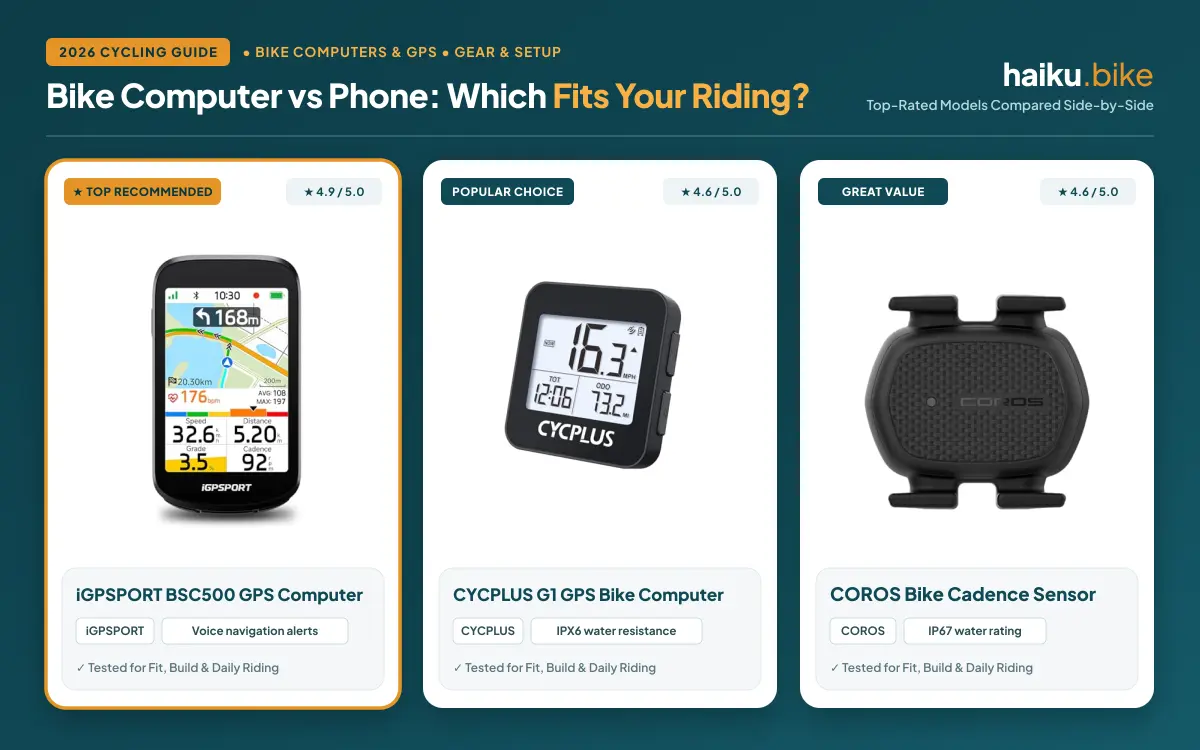
A smartphone in a secure handlebar mount can suit riders who need occasional directions and already manage phone battery and weather protection. A dedicated computer better suits riders who want a separate ride-data display or listed navigation features without keeping a phone screen active. For more context, compare the bike computer and phone trade-offs before choosing.
Final Thoughts
Riders who want a larger screen and several navigation aids should consider the iGPSPORT BSC500 GPS Bike Computer. Its touchscreen, button controls, voice alerts, and automatic rerouting suit unfamiliar routes, but its listed specifications do not state battery life or water resistance.
For GPS recording and a long maker-stated runtime, the CYCPLUS Wireless GPS Bike Computer G1, 70g keeps its feature set focused, though route guidance is not listed. The iGPSPORT BSC300T GPS Bike Computer suits riders seeking offline maps, turn prompts, and extensive ride data, with a smaller display than the BSC500.
Riders who need Bluetooth and ANT+ can consider the COOSPO Color Touchscreen GPS Bike Computer CS600, which lists route guidance and a color touchscreen. Those who mainly want essential GPS tracking can compare the BKVTOP Wireless GPS Bike Computer, 50g, but its features do not list route navigation.
Skip a dedicated computer if your phone already handles occasional directions and you do not need a separate ride-data display. Riders with particular sensor setups can browse the Bike Computers & GPS category and verify compatibility before choosing.
FAQs
Do bike computers need a wheel sensor?
GPS bike computers can record rides without a wheel sensor when they use built-in GPS. The CYCPLUS G1 and BKVTOP describe GPS tracking, and BKVTOP states that its computer does not require a wheel sensor or spoke magnet. A separate sensor may still suit riders seeking particular data, so confirm compatibility with the exact computer before buying accessories.
Which bike computers provide route navigation?
Several bike computers in this guide list route guidance, including the iGPSPORT BSC500, iGPSPORT BSC300T, and COOSPO CS600. Their features differ: the BSC300T lists offline maps and turn prompts, the BSC500 adds automatic rerouting and voice alerts, and the CS600 supports uploaded routes and breadcrumb guidance. GPS recording alone does not mean a computer provides mapped directions.
Can a bike computer connect to Strava?
Some bike computers list Strava support, but the connection type varies by model. The BSC300T lists ride-data sharing, while the BSC500 supports route imports from Strava through its app. The CS600 lists automatic ride-data syncing through COOSPORIDE. Check the manufacturer’s current compatibility information to confirm that the specific route or syncing function you want is supported.
How long does a GPS bike computer battery last?
GPS bike computer runtime depends on the device and how you use its screen and navigation. CYCPLUS lists more than 55 hours for the G1, BKVTOP lists up to 28 hours, and COOSPO lists 36 hours for the CS600. These are separate maker claims, not figures gathered under shared conditions, so actual runtime may differ.
Can I use a bike computer in the rain?
Rain suitability depends on the water-resistance information for the exact bike computer. CYCPLUS lists IPX6 for the G1, while BKVTOP and COOSPO list IPX7 for their computers; ratings are not listed for every option here. Follow the manufacturer’s instructions for wet-weather use, charging, cleaning, and storage instead of assuming all devices offer equal protection.
Do bike computers work with Bluetooth and ANT+ sensors?
Bike computer sensor compatibility depends on the device and its connection protocols. The COOSPO CS600 lists both Bluetooth and ANT+, but descriptions for the other options do not establish support for every sensor type. Confirm that your heart-rate monitor, cadence sensor, or power meter is compatible, and check whether required accessories are included or sold separately.
Should I use a bike computer or a phone for navigation?
A bike computer suits riders who want a dedicated display, ride metrics, or navigation without keeping a phone screen active. A phone can work for occasional directions if you have a secure mount and manage battery and weather protection. Compare the practical trade-offs in our bike computer versus phone guide before deciding which setup fits your rides.
Write Your Review
No reviews yet. Be the first to share your experience!