

Riders exploring unfamiliar roads need directions they can check without repeatedly stopping or reaching for a phone. A bike computer with navigation keeps route cues and ride data on the handlebar, but mapping, rerouting, and screen controls differ widely.
For November 2026, we compare 5 GPS computers from GEOID, iGPSPORT, CooSpo, including options for offline maps, breadcrumb routes, and automatic rerouting. Riders comparing more route-focused devices can browse our guide to bike computers for gravel riding.
At a Glance: Which One Fits You
- Best overall: iGPSPORT BSC500 GPS Bike Computer earns this spot because it combines map navigation, automatic rerouting, dual-band positioning, and voice prompts.
- Best value: GEOID CC600 Color Screen Bike/Cycling Computer earns this spot because it offers colorful route guidance, GPX imports, rerouting, Bluetooth, and ANT+.
- Best for long rides: iGPSPORT BSC200S GPS Bike Computer earns this spot because iGPSPORT lists up to 25 hours of battery life.
- Best for offline maps: iGPSPORT BSC300T GPS Bike Computer earns this spot because it supports offline map downloads, route previews, and turn prompts.

Pros
- Touchscreen and button controls
- Up to 12 data fields per page
- Strava and Komoot route imports
- Automatic off-course rerouting
- Voice navigation alerts
Cons
- Battery life not listed
- Water-resistance rating not listed
- Wireless connectivity details not listed
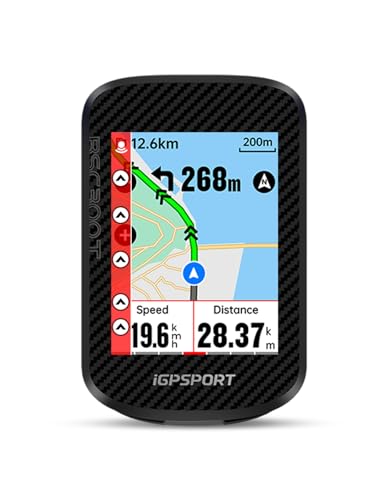
Pros
- 2.4-inch touchscreen and six buttons
- Offline maps and turn prompts
- Off-course route alerts
- ANT+ and Bluetooth 5.0
- Strava and Komoot sharing
Cons
- Battery life not listed
- Water-resistance rating not listed
- Mount details not listed

Pros
- Routes from Strava, Ride with GPS, and Komoot
- Back to Start navigation
- More than 100 riding data fields
- Up to 25-hour maker-rated battery life
- USB-C charging
Cons
- Water-resistance rating not listed
- Wireless protocols not specified
- Requires iGPSPORT app for route setup

Pros
- Color route navigation with automatic rerouting
- WiFi and Bluetooth data transfer
- ANT+ device support
- Customizable data pages and layouts
- Indoor smart-trainer workouts
Cons
- Battery life not specified
- Water resistance rating not listed
- Mount compatibility not specified

Pros
- 2.4-inch color touchscreen
- GPS and GLONASS tracking
- Route upload and breadcrumb navigation
- 36-hour maker-rated battery life
- Bluetooth and ANT+ connectivity
Cons
- Sensors sold separately
- Extension mount not included
- Compatible accessories required for power data
Side-by-Side Comparison
| Computer | Navigation | Display and controls | Satellite support | Battery or storage | Connectivity or protection |
|---|---|---|---|---|---|
| iGPSPORT BSC500 GPS Bike Computer | Maps, turn prompts, automatic rerouting, voice alerts | 3.3-inch touchscreen and buttons | GPS, BeiDou, GLONASS, Galileo, QZSS; dual-band L1 and L5 | Not listed | iGPSPORT app; protection not listed |
| iGPSPORT BSC300T GPS Bike Computer | Offline maps, route preview, turn prompts, off-course warning | 2.4-inch touchscreen and six buttons | GPS, BeiDou, GLONASS, Galileo, QZSS | Not listed | iGPSPORT app; protection not listed |
| iGPSPORT BSC200S GPS Bike Computer | Route import, turn and off-course reminders, Back to Start | 2.4-inch semi-reflective color screen | Not listed | Up to 25 hours; 400 hours of ride storage | Compatible iGPSPORT lights; protection not listed |
| GEOID CC600 Color Screen Bike/Cycling Computer | Color routes, turn reminders, automatic rerouting, GPX import | 2.4-inch color screen and three buttons | GPS, BeiDou, GLONASS, QZSS, Galileo | 100 hours of ride storage; battery life not listed | Bluetooth, ANT+, WiFi; protection not listed |
| COOSPO Color Touchscreen GPS Bike Computer CS600 | Route upload and breadcrumb guidance | 2.4-inch color touchscreen with auto-backlight | GPS and GLONASS | Up to 36 hours | Bluetooth, ANT+; IPX7 |
Navigation behavior matters most when a rider misses a turn or changes plans mid-ride. The BSC500 and CC600 list automatic rerouting, while the CS600 offers breadcrumb guidance; long-distance riders may instead prioritize the stated battery life of the BSC200S or CS600.
Common Mistakes to Avoid
Buyers can confuse breadcrumb guidance with map navigation, although those features provide different route context. The COOSPO Color Touchscreen GPS Bike Computer CS600 supports route uploads and breadcrumb guidance, while the iGPSPORT BSC500 GPS Bike Computer lists map navigation and automatic rerouting.
Another mistake is assuming every computer will pair with every sensor or cycling service. The GEOID CC600 Color Screen Bike/Cycling Computer lists Bluetooth and ANT+, but riders should check the exact sensor and app compatibility they need before ordering.
Touchscreens and buttons can feel different with gloves or in wet conditions, so compare the actual controls before choosing. The BSC300T combines a touchscreen with six buttons, while the BSC200S uses a semi-reflective screen; maker descriptions do not establish visibility in every riding condition.
Satellite system lists do not guarantee consistent reception beneath trees, beside buildings, or in steep terrain. Riders navigating remote routes should save routes in advance, check offline map availability, and carry a backup navigation plan suited to the ride.
Bike Computer with Navigation Buying Guide
Navigation, Maps, and Route Recovery
Navigation features determine how much route context a computer shows and what happens after a missed turn. Map displays, breadcrumb trails, turn prompts, off-course alerts, and automatic rerouting are distinct functions, so look for the specific capability your rides require.
The iGPSPORT BSC500 GPS Bike Computer lists map guidance and automatic route planning after a rider leaves course. The iGPSPORT BSC300T GPS Bike Computer supports offline map downloads and route previews, while the COOSPO Color Touchscreen GPS Bike Computer CS600 describes route uploads and breadcrumb guidance.
Before choosing, check how routes reach the device, such as app creation, third-party platform syncing, or file import. Riders who often alter plans benefit most from explicit rerouting support, while familiar-route riders may find a breadcrumb trail adequate.
Satellite Positioning and Route Reliability
Satellite positioning lets a computer determine location and record a ride without relying on cellular service. Support for several satellite systems or frequency bands can add positioning options, but a longer list alone does not promise accurate guidance in every landscape.
The iGPSPORT BSC500 GPS Bike Computer lists GPS, BeiDou, GLONASS, Galileo, and QZSS, plus dual-band L1 and L5 reception. The iGPSPORT BSC300T GPS Bike Computer and GEOID CC600 Color Screen Bike/Cycling Computer also list five satellite systems, while the COOSPO CS600 lists GPS and GLONASS.
The GEOID CC600 describes WiFi synchronization for assisted GPS data and five-second positioning under stated conditions. Check setup requirements and route preparation, since satellite reception can still vary with surroundings and the computer’s current positioning data.
Battery Life and Ride Storage
Battery life matters most when navigation stays active through long rides or charging opportunities are limited. Compare maker-stated runtime with your longest usual outing, and account for screen use, connected sensors, alerts, and backlighting when judging whether a figure suits your needs.
iGPSPORT lists up to 25 hours for the BSC200S, and COOSPO lists up to 36 hours for the CS600. Battery life is not listed for the other computers in this comparison, so riders needing a specific runtime should confirm current maker information.
Ride storage is separate from battery endurance, so check both if you sync infrequently or save many activities. The BSC200S lists up to 400 hours of ride storage, while the GEOID CC600 lists 100 hours; neither figure describes battery runtime.
Screen Readability and Controls
Screen size and controls affect how quickly riders can read directions and change views while moving. Compare display dimensions, touchscreen functions, physical buttons, and backlighting, then consider your gloves, typical light, and preference for tactile controls.
The iGPSPORT BSC500 GPS Bike Computer combines a 3.3-inch touchscreen with buttons, while the BSC300T pairs a 2.4-inch touchscreen with six buttons. The iGPSPORT BSC200S uses a semi-reflective color screen, and the GEOID CC600 has a 2.4-inch display and three buttons.
The COOSPO Color Touchscreen GPS Bike Computer CS600 lists an auto-backlight that adjusts to ambient light. Consider how often you need to zoom, dismiss prompts, or change data pages, because a touchscreen that suits bare hands may be less convenient with gloves.
Sensor Support and App Compatibility
Sensor and app compatibility determines whether a computer can connect with your existing equipment and share ride data. Bluetooth and ANT+ are wireless standards, but their presence does not confirm support for every sensor, app, or training service.
The GEOID CC600 Color Screen Bike/Cycling Computer and COOSPO CS600 list Bluetooth and ANT+ support. The BSC200S can connect with compatible iGPSPORT front and radar lights, while the iGPSPORT BSC300T supports sharing data with Strava and Komoot.
Confirm your sensor model, phone app, and preferred data-sharing services in maker compatibility information before ordering. Riders comparing related devices can browse the GPS bike computer category and check route syncing against their current workflow.
Weather Protection and Ride Conditions
Weather protection matters when a computer stays mounted through rain or road spray. Look for a specific water-resistance rating rather than relying on a general outdoor-use claim, and follow maker guidance for charging, cleaning, and storage after wet rides.
The COOSPO Color Touchscreen GPS Bike Computer CS600 lists IPX7 protection, while ratings are not listed for the other computers here. That distinction may matter to wet-weather riders, but the rating does not replace the maker’s care instructions.
Controls also affect usability in poor weather, when wet fingers or gloves can make touchscreen operation less convenient. Physical buttons may suit riders who want tactile input, but compare the particular layout rather than assuming one interface works best for everyone.
How We Chose
We score computers with the Haiku Ride Score: core performance 30%, build and weather resistance 20%, ease of use 20%, compatibility and battery 15%, and value 15%. These criteria help us compare navigation, controls, connectivity, and endurance without treating one feature as decisive for every rider.
Our evaluation draws on manufacturer specifications, compatibility information, and long-term owner feedback where available. We research and draft our guides with software tools, including AI, then run automated checks on product fit, sourcing, and our editorial rules. Our editor spot-checks guides rather than reading each one before publication. Our how we review page explains the method.
Price and Value: What Each Budget Gets You
Budget
Budget-oriented computers can provide GPS tracking, route prompts, and useful ride data without a large screen or extensive mapping tools. The GEOID CC600 Color Screen Bike/Cycling Computer adds GPX imports, automatic rerouting, WiFi, Bluetooth, and ANT+, but its battery life is not listed. Riders who need published endurance figures or richer map interaction may prefer another option.
Mid-Range
Mid-range computers can balance route features, display controls, and ride endurance without prioritizing every premium convenience. The iGPSPORT BSC200S GPS Bike Computer offers route imports, Back to Start guidance, and maker-stated battery life, while the COOSPO CS600 adds a touchscreen, breadcrumb navigation, and IPX7 protection. Riders may give up full offline maps or automatic rerouting, depending on their choice.
Premium
At the upper end of this group, buyers can find larger touchscreens, voice directions, richer route handling, or offline maps. The iGPSPORT BSC500 GPS Bike Computer combines dual-band positioning, map navigation, automatic rerouting, and voice prompts; the BSC300T adds offline maps and route previews. Neither product has a listed battery runtime, a consideration for riders planning extended days out.
Choosing Something Else
A smartphone with a secure handlebar mount can suit riders who navigate occasionally and already rely on a cycling app. A phone may offer familiar maps and route planning, but screen exposure, battery use, and operation in poor weather can be drawbacks on longer rides. Riders who want a dedicated display and ride data may prefer a computer.
Final Thoughts
Riders who value route recovery and spoken cues should consider the iGPSPORT BSC500 GPS Bike Computer. Its map navigation, automatic rerouting, dual-band positioning, and voice alerts provide several ways to follow directions, though its battery runtime is not listed.
For planned routes that need offline maps, the iGPSPORT BSC300T GPS Bike Computer offers downloads, previews, and turn prompts, but its battery life is also not listed. Long-distance riders may prefer the iGPSPORT BSC200S GPS Bike Computer for its maker-stated runtime and Back to Start navigation.
The GEOID CC600 Color Screen Bike/Cycling Computer suits riders seeking rerouting, GPX imports, Bluetooth, and ANT+ in one unit. Riders prioritizing a touchscreen, breadcrumb navigation, and a listed IPX7 rating can consider the COOSPO Color Touchscreen GPS Bike Computer CS600, while noting that it does not list automatic rerouting.
Riders who rarely follow planned routes or want to avoid another device may prefer a phone mount instead. Compare our guide to budget bike computers or the Bike Computers & GPS category if these navigation trade-offs do not fit your needs.
FAQs
Do bike computers with navigation need a phone connection?
Bike computers with navigation may use a phone app to create, import, or transfer routes, but ride guidance can appear on the computer itself. The iGPSPORT BSC500 accepts routes through its app and third-party platforms, while the GEOID CC600 supports GPX imports through an app. Check route setup and offline behavior before riding beyond phone coverage.
Can a GPS bike computer reroute after a wrong turn?
A GPS bike computer reroutes after a wrong turn only when its navigation features explicitly support recalculating a route. The iGPSPORT BSC500 and GEOID CC600 list automatic rerouting, while the BSC300T describes off-course warnings. An alert is not the same as new directions, so check product features if route recovery matters to your rides.
Which Bike Computer with Navigation in 2026 has the longest stated battery life?
The COOSPO Color Touchscreen GPS Bike Computer CS600 has the longest stated battery life among these computers, with COOSPO listing up to 36 hours. iGPSPORT lists up to 25 hours for the BSC200S. Actual runtime can depend on use, and battery life is not listed for the other models in this comparison.
Can I use a bike computer with navigation without cell service?
A bike computer can use satellite positioning without cellular service, but saved route and map availability depends on its features and preparation. The iGPSPORT BSC300T lists offline map downloads, while other computers describe route imports or app-based setup. Download or transfer the route before a remote ride, and confirm whether the map itself remains available offline.
Do bike computers connect to ANT+ and Bluetooth sensors?
Bike computers connect to ANT+ and Bluetooth sensors only when both devices support a compatible standard and profile. The GEOID CC600 and COOSPO CS600 list both wireless standards, but that does not confirm support for every sensor. Check manufacturer compatibility information for your exact device and the data fields you want to display before purchasing.
Are bike computers with navigation waterproof?
Water protection varies by bike computer, so riders should check for a stated rating instead of assuming every unit withstands heavy rain. The COOSPO CS600 lists IPX7 protection, while ratings are not listed for the other computers here. Follow maker instructions for charging, cleaning, and storage, especially after wet rides.
How do I choose a screen for bike navigation?
Choose a bike navigation screen by comparing its size, display type, controls, and how you plan to read directions. The iGPSPORT BSC500 combines a 3.3-inch touchscreen with buttons, while the BSC200S uses a semi-reflective display. Consider gloves, sunlight, and how often you need to change screens before choosing.
Which GPS bike computer works for gravel routes?
A GPS bike computer for gravel should match your route format, map needs, and ability to recover from missed turns. The iGPSPORT BSC300T offers offline maps and route previews, while the BSC500 lists automatic rerouting. Riders can compare more route-oriented options in our gravel bike computer guide before deciding.

Write Your Review
No reviews yet. Be the first to share your experience!